
Material Management
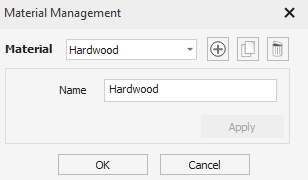
This dialog is used to edit and manage the list of materials for use in the tool database. It can be accessed through the Toolpaths Menu or the Tool Database dialog.
 Material List
Section titled “ Material List”List the materials added to the database. Selecting a material activates it. This allows it to be edited in this dialog. In the Tool Database dialog, it results in switching the cutting data of the tools to be the set defined for the active material / machine (if any).
Add Material
Section titled “ Add Material”Add a new material to the database and makes it active ready for editing.
Duplicate Material
Section titled “ Duplicate Material”Duplicates the active material and makes the new material active ready for editing.
Copy Cutting Data
This could optionally duplicate all the cutting data associated with the original material for all the tools so that there is a new set of cutting data for the new material as well.
Delete Material
Section titled “ Delete Material”Delete the active material and activate the next one up in the list.
Deleting Cutting Data
This is a destructive process deleting all the cutting data associated with this material across all the tools.
Allows us to set the active material’s name (if any). Two materials cannot have the same name.
Apply Changes
Section titled “ Apply Changes”Apply changes by clicking Apply or OK. Clicking Cancel will discard any changes made.