
Vector Boundary
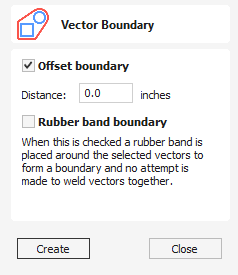
The Vector Boundary form allows you to create boundaries around selected vectors.
Watch this video to see this in action:
 Offset Boundary
Section titled “ Offset Boundary”When this is checked ✓ the created boundary is offset outwards by the distance specified.
Rubber Band Boundary
Section titled “ Rubber Band Boundary”When this is checked ✓ the created boundary is the result of stretching a rubber band around the currently selected vectors.
The images below demonstrate the difference between the two types of boundary that the form creates. The picture on the left illustrates the standard offset output and the one on the right shows the result when Rubber band boundary option is checked ✓.
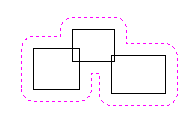
Offset Boundary only
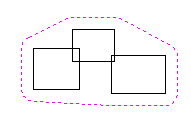
Offset Boundary and Rubber Band together
Usable In Both Views
Section titled “ Usable In Both Views”This tool can be used in both the 2D and 3D View.
2D View offers a more direct way to view your vectors while 3D Offers more flexability to work with Vectors in 3D Designs and to make use of the Edit Boxes.