
Toolpath Tabs
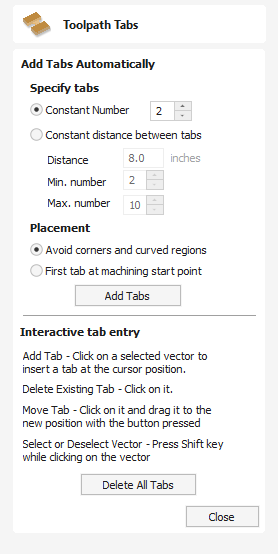
The tab placement dialog allows you to place tabs either automatically or dynamically.
 Add Tabs Automatically
Section titled “ Add Tabs Automatically”Automatically place the tabs by setting the Tabs options and clicking the Add Tabs button
Specify Tabs
Section titled “ Specify Tabs”There are 2 options:
- Constant number - Attempts to add the specified number of tabs by distributing them evenly along the vectors.
- Constant distance between tabs- Attempts to add tabs at regularly spaced distances.
Placement
Section titled “ Placement”There are two options for placement of tabs. The first tab can be placed at the machining start point, using the corresponding option. Otherwise, the Avoid corners and curved regions option can be used. This option will try to avoid placing the tabs at corners, whilst still trying to use the options above which specify the number of tabs and the distance between them.
Note
It may not always be possible to avoid all corners, whilst trying to place the chosen number of tabs and have them spaced relatively evenly.
Interactive Tab Entry
Section titled “ Interactive Tab Entry”You can interactively add tabs by clicking in the 2D view.
Add Tab
Section titled “ Add Tab”Click on the vector where no tab exists to insert a new tab.
Delete Tab
Section titled “ Delete Tab”Click on an existing tab to delete it.
Move Tab
Section titled “ Move Tab”Click on the tab and drag to move it along the vector into the new position.
Delete All Tabs
Section titled “ Delete All Tabs”Click the Delete All Tabs button to delete all of the tabs.