
Fit Curves To Vectors
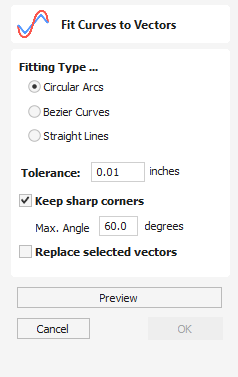
This function allows the user to fit arc, Bezier curves or straight lines to selected vectors. The newly created vectors will be approximated based on a user defined tolerance. Using this function can aid with smoothness for some toolpath options and also help to simplify data for modeling purposes.
Watch this video to see this in action:
 Fitting Type
Section titled “ Fitting Type” Circular Arcs
Section titled “ Circular Arcs”Checking ✓ this option means the selected vectors will be approximated using arcs:
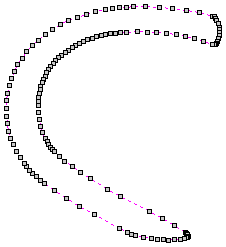
Before Fitting
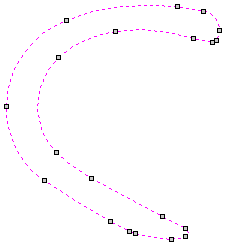
After fitting
Bezier Curves
Section titled “ Bezier Curves”Checking ✓ this option means the selected vectors will be approximated using Bezier curves.
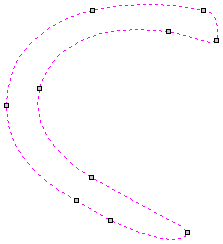
Fitted with Bezier spans
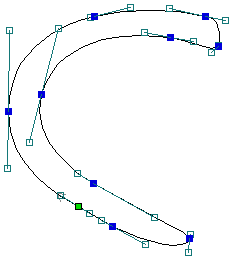
The same bezier spans in Node-edit mode
Straight Lines
Section titled “ Straight Lines”Checking ✓ this option means the selected vectors will be approximated using straight lines.
The vector before fitting
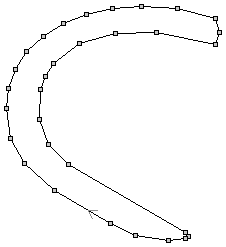
The same vector fitted with straight lines
Tolerance
Section titled “ Tolerance”The value which is set in the Tolerance area determines how closely the original vectors will be approximated. The newly created, Arcs, Beziers or Lines will be generated within a distance of the original vector which is plus or minus the specified Tolerance value. The smaller the value the closer to the original the new data will be but it will also mean more data points will be used. A larger Tolerance will not be as accurate to the original but will have less data points.
Keep Sharp Corners
Section titled “ Keep Sharp Corners”Checking ✓ this option will make the Curve Fitting routine keep sharp corners which have a difference greater than the Max Angle value specified. Any corners where the difference in angle is less than this value will be modified within the specified tolerance.

Initial Vectors
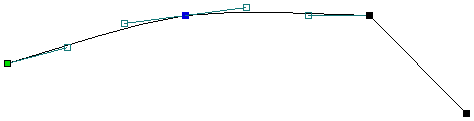
Result after Keep Sharp Corners (max. angle = 20 degrees)
Replace selected vectors
Section titled “ Replace selected vectors”Checking ✓ this option will delete the current vectors and replace them with the new curve fitted vectors. Un-checking it will keep the original vectors as is and in addition create new curve fitted vectors. The new vectors will always be created on the currently selected Layer.
Usable In Both Views
Section titled “ Usable In Both Views”This tool can be used in both the 2D and 3D View.
2D View offers a more direct way to view your vectors while 3D Offers more flexability to work with Vectors in 3D Designs and to make use of the Edit Boxes.