
Measure - Inspect
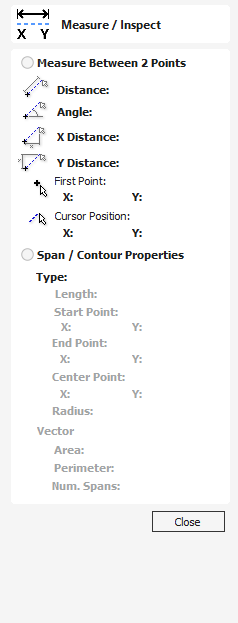
The Measure tool allows you to find important information about your model or drawings.
Watch this video to see this in action:
 Measure Between 2 Points
Section titled “ Measure Between 2 Points”With this option selected, you can click on two points in the 2D View and the form will report the measurements between the clicked locations
Distance
Section titled “ Distance”Straight line distance between the two points.
The angle (in degrees) of the line joining the two points, where horizontal is zero degrees and vertical is ninety degrees.
X Distance
Section titled “ X Distance”The separation between the two clicked points in X only.
Y Distance
Section titled “ Y Distance”The separation between the two clicked points in Y only.
First Point
Section titled “ First Point”The precise X and Y coordinates of the position first clicked.
Cursor Position
Section titled “ Cursor Position”The dynamically updated coordinates of the mouse cursor position.
Span / Contour Properties
Section titled “ Span / Contour Properties”This mode allows you to find precise information about the individual spans of a vector shape in 2D View. Use your mouse pointer to click on any part of the shape and the information relating to the entity you have clicked will be displayed on the form.
The type of span you have clicked.
Possibilities include:
- Line
- Arc
- Bezier Curve
Length
Section titled “ Length”The length of the clicked span.
Start Point and End Point
Section titled “ Start Point and End Point”The precise coordinates of the node forming the start and end of the selected span.
Vector
Section titled “ Vector”Information relating to the whole vector, of which the selected span is part, is shown in this section.
The total area of the selected vector
Perimeter
Section titled “ Perimeter”The total length of all the spans forming the perimeter of the shape
Num. Spans
Section titled “ Num. Spans”The total number of spans in the shape.